
Welcome to dBASE® 2019…


Product Optimized
Features Optimized Productivity!
Introducing Motifs

The new Motifs allow users to set either Dark or Light for their development look and feel. These are different from just the Editor color change or the application theme, Motifs allow users to enhance their entire development environment.
Welcome to dBASE® 2019 and our new buddy, Creature Feature!

The dBASE® 2019 product has been OPTIMIZED to make development easier, faster, and frankly more fun!
Whenever, you see Creature Feature, you know we have added new capability to make your job better.
What else is New in dBASE 2019?
dBASE® 2019 release is focused on OPTIMIZATION of the entire product but it includes many great features for the IDE.
We have also added new capabilities with the Compiler functionality. We have enhanced how you develop in the Editor. Plus we implemented the #1 requested component and finally we end with a general overhaul to ADO.

The IDE is where the magic happens, why not give users a say in how it works? 80% of the time is spent in the editor, while 20% is in graphical designers. The IDE has been optimized with new and updated features.

These features have been coming for many years, i.e. the new application font setting and size, now allows you to set your font family and font size for Menus, Tabs, Inspector, and status bars. As, you can see on the left, the standard font since the IDE upgrade in 2012, now check out the right, the font family set to Segoe UI, and the font size is 14! Much easier to read!


80% of the developer's time is spent in the Source Code Editor. Why not optimize it for better productivity? dBASE® 2019 adds new and updated features.
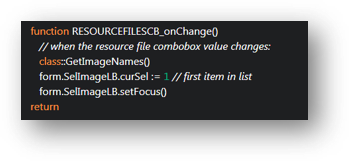
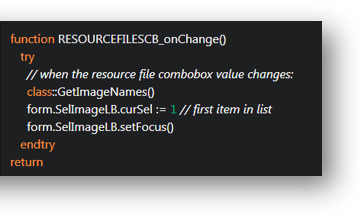
dBASE® 2019 introduces the new Surround functionality. This new feature will change the way you develop code and make writing it faster.


Find In Files - Updated functionality to make the developer more productive. Now allows more information to be displayed for easier reading.

Bookmarks: with Margins turned On

Bookmarks: with Margins turned Off

Other areas we OPTIMIZED in the IDE portion of the dBASE® 2019 Product:
dBASE® 2019 focused on ensuring consistency throughout the entire project.

Toolbars and Menus

Navigator

Command Window

In today’s world, complexity is everywhere.
dBASE® 2019 has been updated and optimized with compiler features to support this growing complexity.
With massive increases in the supported source sizes and the introduction of embedded manifest files in the .exe.


In dBASE® 2019 we have added one of the most requested features in dBASE history and it has got done in 2019. That would be the ArrayRowSet! This allows you to treat an Array as a data source, which it is, but the underlying dBASE® product did not understand it. Therefore, we have built a great new feature that allows you to work with Arrays like a RowSet.

Create:
this.RARRAY = new ARRAYROWSET(this)
with (this.RARRAY)
endwith
Associate:
form.rowset = form.rArray
Loading:
function load_Array()
form.a = new array()
form.a.dir()
form.aFields = new array()
form.aFields.add("fName")
form.aFields.add("Size")
aRowset.load(aDir,aFields)
...

Like the compiler there are many fixes and updates we have done to the ADO functionality, much of it is not seen, but things will run better.
dBASE® 2019 adds new and updated features to ADO.

dBASE® 2019 is a Game Changer
From beginning to end, dBASE® 2019 has optimized the speed of development! dBASE® 2019 gives you a complete deployment solution as well. dBASE® 2019 has all the tools a business person could want for implementing situational applications, but has the power to be a serious professional data-driven application development environment.
New License
dBASE® 2019
Get all the new features and functionality for a great price!
Buy the new dBASE® 2019 for $499.00 (USD).
Upgrade License
dBASE® 2019
Already own dBASE? You can upgrade for a very special price!
Buy the new dBASE® 2019 Upgrade for $399.00 (USD).
Copyright 2024 All Rights Reserved dBase LLC
30 Charles Street Binghamton, NY 13905